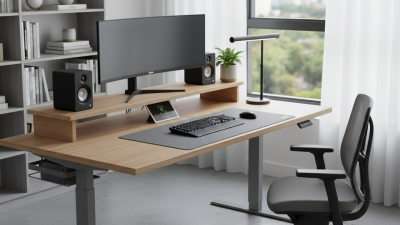
Why Choose a Computer Desk for Your Workspace?
Why Choose a Computer Desk for Your Workspace?
A workspace shapes how you sit, focus, store tools, and recover between demanding tasks. A suitable Computer Desk gives those daily actions a stable, deliberate structure. It can position your monitor near eye level, leave room for your keyboard, and reduce awkward reaching. These details feel minor at first. They are not.
Alan Hedge, a respected ergonomics researcher and former Cornell University professor, often stated, “The best posture is the next posture.” This principle explains why a quality Computer Desk should support movement, not force one rigid position. Adjustable height, generous legroom, rounded edges, and accessible cable management can make changing positions easier. A practical desk also keeps frequently used items within reach, while preserving clear space for writing or planning.
The benefits extend beyond comfort. A well-designed desk can separate work from clutter, improve visual focus, and make a small room feel more controlled. It may support a monitor arm, laptop stand, task light, or modest storage system. Still, a desk is not magic. Poor chair height, weak lighting, and long uninterrupted sessions can undermine even excellent design. I have learned that “ergonomic” labels deserve careful inspection. Some products promise more than they deliver.
The right choice depends on your body, equipment, room, and working habits. Measure before buying. Test the height whenever possible. A Computer Desk should serve your routine quietly, without demanding attention. That quiet support is its real value.
What Is a Computer Desk and What Makes It Different?
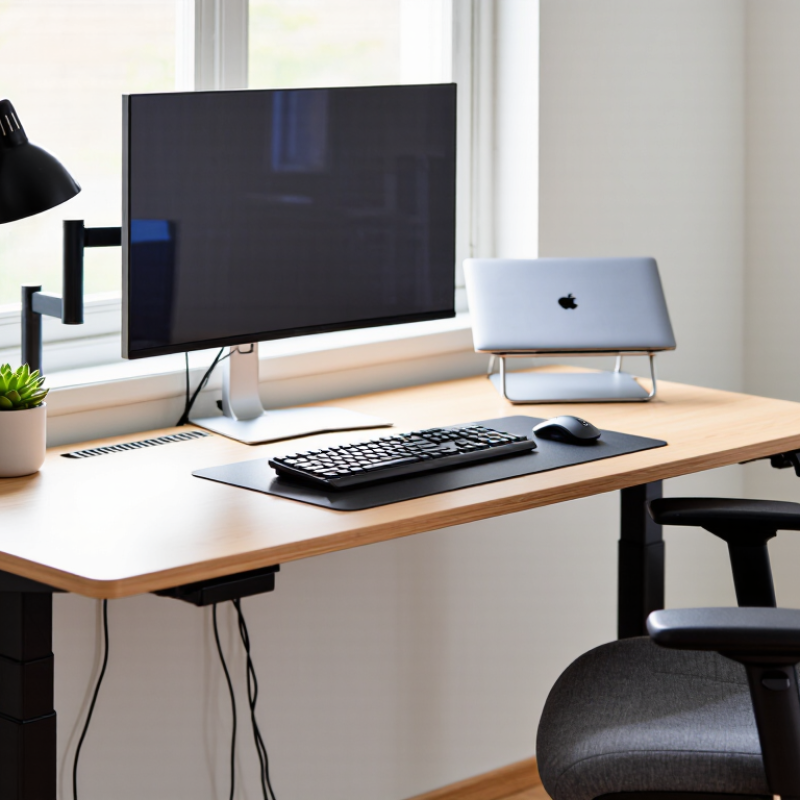
A computer desk is a work surface designed for digital tasks. It usually supports a monitor, keyboard, mouse, and computer tower. Unlike a general table, it often includes cable openings, storage shelves, or a raised monitor area. These details keep equipment organized and leave space for writing or documents.
In my workspace, a suitable desk reduced shoulder tension because the keyboard stayed near elbow height. A stable frame also stopped the monitor from shaking during typing. However, not every feature is useful. A deep shelf may collect clutter, and a narrow tabletop can feel restrictive. Desk choice still depends on room size, equipment, and daily habits. That part is easy to underestimate.
Tips:
Measure your available space before buying. Keep about 60 to 75 centimeters between your eyes and the monitor. Check whether your knees fit comfortably beneath the desk. Choose a surface that resists scratches and feels easy to clean. If you use several devices, plan cable routes before installation. I once ignored this step, and loose cables quickly became annoying. A computer desk should support comfortable work, not simply look technical.
How a Computer Desk Supports an Efficient Work Setup
A computer desk supports efficiency by giving every task a physical place. In remote work, that structure matters. The U.S. Bureau of Labor Statistics reported that 23.2% of employed people worked from home on an average day in 2023. A dedicated desk can separate work from meals, sleep, and household distractions.
Desk dimensions affect comfort more than appearance. The Occupational Safety and Health Administration recommends placing the monitor about 20 to 40 inches from the eyes. Its guidance also supports a screen top at, or slightly below, eye level. A desk with enough depth allows this position without pushing the keyboard too far away. Keep both feet supported. Keep elbows close to the body.
Small details reduce repeated interruptions. A rear cable channel prevents one loose wire from catching your wrist. A shallow drawer keeps notebooks within reach. Leave clear space beside the mouse. It sounds minor. It is not.
In practice, I have found that tidy storage improves focus, but only when frequently used items remain visible. Hiding everything can create another problem: forgotten tools and unnecessary movement. The best setup is not perfectly minimal. It is adjustable, stable, and honest about how you work. A 2023 review in the International Journal of Environmental Research and Public Health also linked poorly arranged home workstations with increased discomfort, reminding users that convenience should not replace posture checks.
Key Features to Consider When Choosing a Computer Desk
Choosing a computer desk is less about appearance than daily physical fit. OSHA’s Computer Workstations eTool advises placing the monitor directly ahead, with its top at or slightly below eye level. Desk depth should support that position without pushing your shoulders forward. Measure your monitor, keyboard, and viewing distance before buying. A tidy surface is not enough. Legroom matters.
Height is the key feature. A fixed desk may suit one user and strain another. Look for adjustable legs or a height range that keeps elbows near 90 degrees. Your shoulders should remain relaxed. The WHO/ILO 2021 joint estimates link working 55 or more hours weekly with a 35% higher stroke risk and a 17% higher risk of ischemic heart disease. A desk cannot remove long-hour risks, but it can support posture changes. Consider alternating sitting and standing, rather than treating standing as a cure.
Check stability, edge shape, cable routing, and load capacity. A monitor arm needs a firm rear section. A deep drawer can steal knee space. For small rooms, measure the chair’s movement zone, not only desktop width. In practical workspace reviews, users often choose storage over clearance, then stop using the desk comfortably. I have made that mistake in planning. The cleaner choice was not the better one. Select a surface that supports your mouse, notebook, and forearms. Recheck the setup after a week.
How Desk Size and Layout Affect Workspace Organization
Why Choose a Computer Desk for Your Workspace?
How Desk Size and Layout Affect Workspace Organization
A computer desk should fit your work, not simply fill an empty wall. I usually measure the room before choosing a desk. A depth of 60 to 75 centimeters gives space for a monitor, keyboard, and notebook. It also helps keep the screen at a comfortable viewing distance. A narrow desk may look neat, but it can quickly become crowded. That happened in my home office.
Desk width affects how easily you separate tasks. Around 120 centimeters can support one monitor and basic paperwork. Wider surfaces allow a second screen, writing area, or small lamp. Keep frequently used items within easy reach. Place the monitor near the center, with the keyboard directly in front. Store documents in a drawer or vertical holder. Clear paths matter, too. A chair should move without striking nearby furniture.
Layout also influences daily concentration. I once placed a desk beside a bright window. Glare appeared on the screen every afternoon. Moving it slightly sideways solved most of the problem. Cable openings near the rear edge can reduce visual clutter. However, too many accessories may reduce usable space. A clean layout is not always a productive one. Personal habits still matter. Test the arrangement for several days, then adjust the parts that interrupt your work.
Why Choose a Computer Desk for Your Workspace?
Desk size and layout directly influence organization. A deeper and wider desk provides more room to separate your computer, writing, and storage zones, while sufficient circulation space keeps the workspace comfortable and accessible.
Planning reference: Compact desks suit essential computer tasks, standard desks support separate work zones, and spacious desks provide greater flexibility for monitors, documents, and accessories. The circulation figures represent practical clearance targets for movement around the desk.